Portfolio
See how your copies, your practice trades, your live account and the traders you follow did.
Portfolio shows your results. It answers one question: how did my copies and trades do? It has a practice part and, once you trade with real money, a live part. The two are always kept apart.
Practice or Live
At the top, pick which money to look at:
- Practice: practice money. Your copies from For You and your own practice trades.
- Live: your live account on Hyperliquid, with real money.
The switch shows once you have a live account. Live results are never added to practice.
Next to it, pick the Range: 7D, 30D, 90D or All.
Your copy plan
Your plan's account strip and Plan controls are here: your money, today's result and limit, the rising Floor, and your traders. Add or take out available money, change the risk, pause or resume copying, or stop and close everything. See For You for what each change does.
Practice results
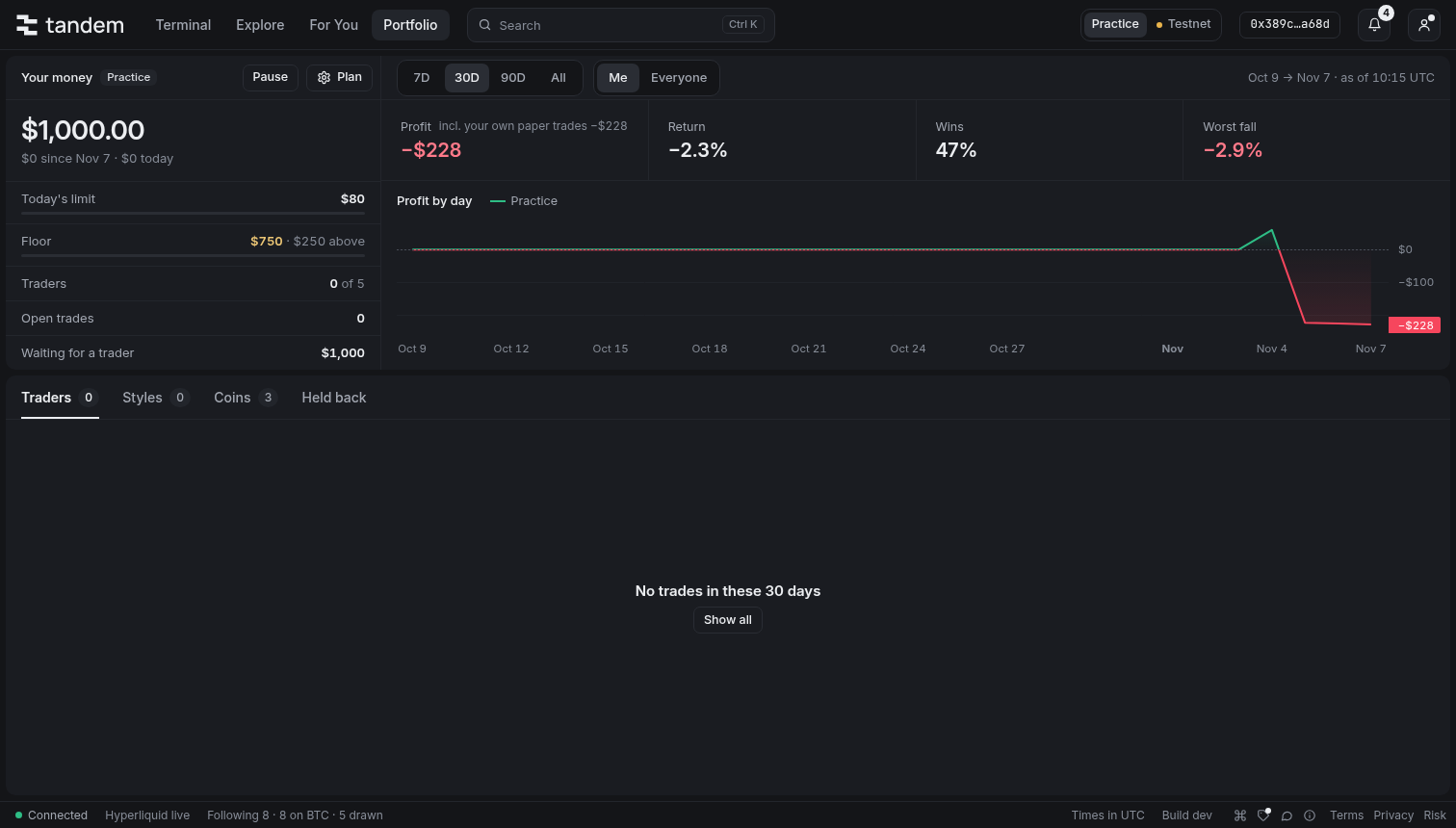
The four figures
| Figure | What it means |
|---|---|
| Profit | What you made or lost in the range, after fees and funding. |
| Return | Profit divided by the most money you had at work in the range. |
| Wins | How many closed trades made money, for example "12 of 20 trades". |
| Worst fall | The largest fall from a high in the range, with your worst trade under it. |
Profit by day
The chart shows your profit day by day.
- The solid line is Practice: what your copies and trades actually did with practice money.
- The dashed line is If copied: what the traders you follow would have made if you had copied each with $1,000 on the Balanced risk level.
"If copied" is a what-if
It is never money you made. It helps you judge the traders you follow, and it is always labelled, drawn apart, and never added to your real figures.
Traders, best to worst
The list below shows each trader, best to worst, with profit, return, win rate, worst drop and trades. Use Show to see All, only Practice (copies and your own practice trades), or only If copied (traders you follow but don't copy).
Click a trader to open its details: its best and worst trade, its fees and funding, and its trades in the range.
On a trader you copy, the details have Share: the copy's result as an image to post. See Share cards.
A trader you countertrade is marked with a Countertrade badge, so its results are never taken for a copy's.
Styles, Coins and Held back
The other tabs show the same results in other ways:
- Styles: results grouped by how long traders hold, and by kind of trader.
- Coins: results by coin.
- Held back: what kept your results from matching the traders'.
Held back shows:
- Skipped trades, and why: for example "Too small to copy", "Price ran ahead", "Leverage over 10×", or "Opened before we copied". You see what each one would have made.
- Costs: fees, funding paid and received, and slippage.
- Speed: the usual delay before a copy was placed, and the slowest 1 in 10.
- Stops: trade stops, days at the day's limit, and whether the floor was reached.
Live results
The live part shows your own Hyperliquid account, as Hyperliquid has it. It is marked Live everywhere.
At the top are four figures: Equity, Open P&L, Closed, after costs and Wins.
Equity is your account's value on Hyperliquid now, open P&L included, with what is free and what is in margin under it. On a unified account, Equity is your spot USDC total, which is Hyperliquid's own value for the account: the margin and result of your open positions already sit inside it. What is free is then your spot USDC that isn't held for positions.
Beside the figures, Costs in the range puts each cost on its own line:
- Closed P&L: what the closed trades made before fees and funding.
- Hyperliquid's fees: Hyperliquid's own trading fees.
- tandem's fee (0.01%): tandem's fee on each live order, or 0.005% if you joined through a friend's invite link. It is charged inside each fill's fee, so the two fee lines add up to the fees you paid.
- Funding paid or Funding received: on open positions.
- After costs: what is left.
Below are four tabs:
- Positions: entry, mark, value, open P&L, funding and liquidation price.
- Copies: each copy that trades your live account, shown on its own. A countertrade has a Countertrade badge, and reads Countering while it runs.
- Closed trades: closed P&L after the fees of their fills.
- Fills: every fill, which you can download with Export CSV. A countertrade's fills carry its badge too.
A live copy or a closed trade has a share icon at the end of its row: it makes a card of its result. See Share cards.
Only the latest 10,000 fills
Hyperliquid keeps only an account's latest 10,000 fills. If your range reaches further back, the oldest fills are missing, and Portfolio says so.
Read more in Live trading and Fees.
No results yet?
Results start with your first copied or practice trade. Press Find traders to look for traders to copy.
Hide your amounts
Press H, or use Hide my amounts in the account menu, to hide your dollar amounts on this page and everywhere else.