For You
The simple way to pick traders by style and copy them, with limits you set once.
For You is tandem's simple trading page, and it is open to everyone: you don't need an account to look. It lists the traders tandem picks and the ranked traders by style, so you can pick who to follow and copy from one page.
Without an account
Open For You from the bar (or press Alt + 3). You see:
- tandem's picks, each with a short line on why we pick it;
- the traders and the style filter: All, Scalpers, Day traders, Swing traders or Quants;
- each trader's sheet when you click its row: its own trading record, how it exits and the markets it trades. These are the trader's results, not a promise of what your copy would make.
Follow and Copy ask you to sign up first. Once you have signed up, you come back to the same trader.
Signed in
- Follow adds the trader to the traders you follow, as in Explore. They show under You follow.
- Practice copying is available to signed-in members while Practice for members is on. Set an amount and a risk level, then copy with practice money. No real order is sent and you don't need a wallet.
- Live copying uses your own Hyperliquid account. It needs live access for your account, a connected wallet, enabled live trading and New copies switched to live in Settings. The app tells you if access is unavailable.
Practice availability
Practice can be closed to new starts or temporarily full. The app says which. Existing practice copies keep running and you can stop them. Practice copying does not grant access to the Terminal's separate manual paper-trading account.
Set up your plan
When you start a plan, For You asks two questions. The list of traders below updates as you answer.
How much do you want to put in?
Pick $500, $1,000 or $5,000, or choose Other and type your own amount, from $10 (Hyperliquid's smallest order).
How much risk is OK?
Pick one of three levels. Under the levels, you see your limits in dollars for the amount you picked.
| Most to lose on one trade | Most to lose in one day | Everything stops after a drop of | Highest leverage | |
|---|---|---|---|---|
| Careful | 1% of its share | 3% | 10% | 2× |
| Balanced | 2% of its share | 5% | 20% | 3× |
| Bold | 4% of its share | 10% | 35% | 5× |
Click Adjust to set your own numbers instead (Your own).
Show my traders
When you're happy with your answers, press Show my traders.
Your limits, in plain words
- Most to lose on one trade: the most one copied trade may lose, as a share of that trader's money. It is fixed when the trade opens.
- Most to lose in one day: if your plan loses this much in a day, every trade closes and copying pauses until the next day starts (00:00 UTC, shown in your own time), and for at least 12 hours.
- Everything stops at (the Floor): if your money falls this far below its best, everything stops and every trade is closed. The floor rises as your money grows.
- Highest leverage: the most leverage a copied position may use.
Limits make losses smaller, not impossible
In a fast market, a trade can close below your floor or past your limit. See Risks.
The page
Your money, limits and Plan controls live in Portfolio. For You links there with Money and results in Portfolio. A notice appears when a limit or a paused plan needs your attention.
With a plan there are three tabs: For you, Copying and Activity. Without a plan, you can browse traders and follow before starting one.
Pick traders
The For you tab helps you choose among:
- tandem's picks: traders selected by the latest completed research run.
- You follow: traders you follow in Explore.
- Other traders that suit the filters you chose.
Choose 7D, 14D, 30D, 60D or 90D and use Markets, Style and Size to narrow the list. The page names when its research or ranking was last updated. Missing history stays unavailable; it does not mean a zero return.
Use the style filter to narrow the list: All, Scalpers, Day traders, Swing traders or Quants. Scalpers hold for minutes, day traders for hours, swing traders for days to months. Quants trade by rules.
Cards or a list
The For you tab shows each trader as a card. For a table instead, choose List on the Cards / List switch beside the style filter. Tandem remembers your choice.
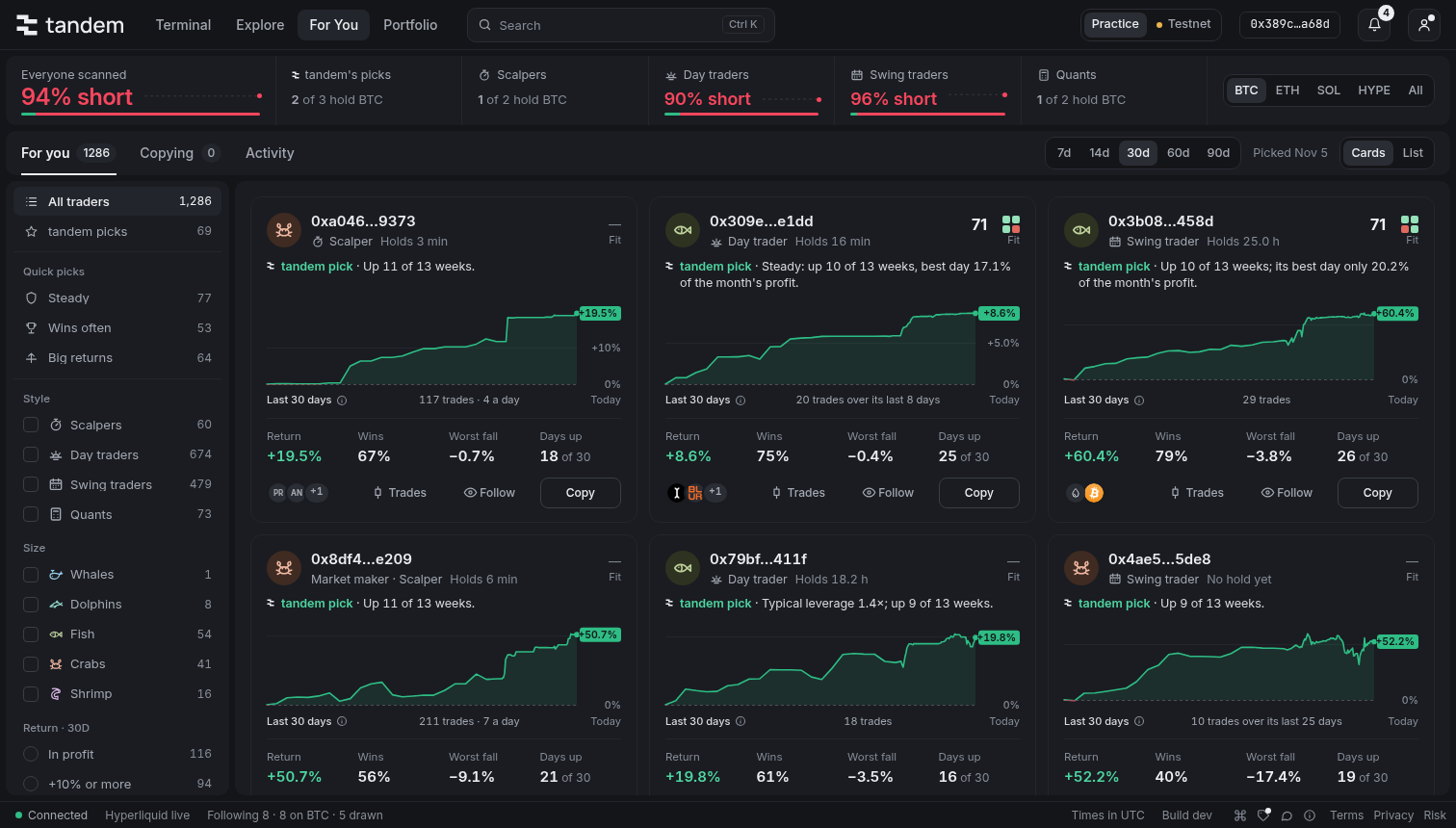
Each card shows:
- the trader's name or short address, its style, how long it Holds a trade, and its Fit for your plan;
- why tandem picked it, or in amber what to watch out for, such as "Fell 31% at its worst";
- a return chart over the period you chose, with its key in the caption; a short record says how many days are available;
- Return, Wins, Worst fall and Days up over that same period. Unread history is labelled Not read yet;
- the coins it trades most, Follow and Copy.
In the list, each row shows the trader's style, its Fit, its own Return, its Wins (for example "6 of 10"), how long it Holds a trade, its coins and, on a wide screen, its Leverage and Worst fall. A warning in amber says what to watch out for, such as "Fell 31% at its worst" or "Quiet for 9 days".
Every figure is the trader's own record, never a guess at what copying it would have made: your own copy can differ, as you may use other leverage, other limits or other exits.
Click a card or a row to open the trader. It shows Its perps over the days you chose: its profit, its return, its wins, how it exits its trades and its return day by day. Beside them: Risk (its worst fall against your floor, and how far its open positions are from liquidation), its Fit and the coins it Trades.
Copy a trader
Press Copy on a card, on a row or in the trader's sheet. The button turns to Copying, and a message offers Undo for a few seconds.
-
Your money is split evenly over your traders. You can copy up to 5 traders, and each needs at least $10, Hyperliquid's smallest order.
-
Needs $X means your share is too small for most of this trader's trades.
-
When your money is split as far as it goes, add money or stop a trader first.
-
A copied trader's trades are copied from its next trades, not the ones it already has open.
-
For You also copies a trader's trades on the stock and commodity markets (HIP-3), such as gold or the S&P 500: any market Hyperliquid has on a dex that settles in USDC, with rules of its own:
- Market hours. A trade starts only while the market's price source is open, from 15 minutes after it opens to 30 minutes before it closes. A trade the trader opens outside those hours is skipped, and Activity says when new trades on that market are copied.
- The gap rule. A position held over a close can reopen past its stop. So each such trade is sized smaller: the most it can lose is the move to its stop plus that market's gap, the largest move it made over a close in the last year, and never less than its least (1 ÷ its most leverage; for example 5.09% on gold, 22.48% on WTI oil when this was written). A market seen for the first time waits until its gap is measured.
- Your day limit. Several such trades held over the same close could lose their limits at once, when your day limit can't act. So a new one is sized down, or skipped, so that together they never lose more than your day limit leaves.
- Markets whose hours tandem doesn't know (some stocks and rates on other dexes) are copied too, at any hour, sized as if their price could jump twice as far over a close (twice their least). The trade's line says "hours not known: sized for a bigger overnight move".
The trader's pop-up names the stock and commodity markets it trades that For You copies, for example "Also trades gold and the S&P 500".
No Countertrade in For You
For You takes the trader's side only: it never offers Countertrade. You can't copy a trader here while you countertrade them, and a trader you countertrade isn't marked You follow.
Watch your copies
Copying lists the traders you copy, their open trades and the latest trades. Each one says, for example, "Copying since Oct 28 · $352".
A trader can pause on its own: after 3 losses in a row, or when it took out most of its money. A trader also stops when its share falls by your drop limit. You can Resume a paused trader from its sheet.
To stop one trader, open its sheet and press Stop copying. Its open trades close.
Change your plan
In Portfolio, press Plan to:
- Add money (from $10) or Take out money. Open trades keep their money, so you can only take out what is free.
- Change your risk level or your own numbers. Every change starts at once, looser or stricter.
- Pause copying or Resume copying. While paused, open trades still follow your traders' exits.
- Stop and close everything. It asks first.
After a stop, press Start again to begin again with the money you have, at once. After the floor is reached, Start again first asks how much risk is OK.
Practice copies and live copies
| Money | Where results show | |
|---|---|---|
| Practice copies | Practice money, available to members while practice is open. | Under Practice in Portfolio. |
| Live copies | Real money in your own Hyperliquid account, after live access and setup. | Under Live in Portfolio, kept apart and never added to practice. |
A plan uses one kind of money. Changing New copies does not move existing copies. To change a practice plan to live, stop it and start again with live copying enabled. Switching off live copying does not turn a running live plan into practice. The app checks the live account's available money before a start or an increase.
Alerts
In the Activity tab, press Alerts to choose what reaches your devices:
- When a limit closes my trades: today's limit, the floor, or a trader stopped at its own drop.
- When a trader is paused: three losses in a row, most of its money taken out, or liquidated.
- Every copied trade: each trade copied, and each one closed at its limit.
Switch on Push to this device to get them even when tandem is closed. The same choices, with email, are in Settings, under Alerts.